7-8 Pose Estimation
PANDORA DEVELOPER GUIDE · CHAPTER 07
Learning Objectives
Pose Estimation is a task in computer vision aimed at enabling a computer to understand the pose, joint positions, and motion structure of a person or object, rather than just knowing where it is.
For example, in human pose estimation, the model identifies in an image or video:
1. Keypoints
For example:
- Head, eyes, shoulders
- Elbows, wrists
- Hips, knees, ankles
2. Skeleton
Connects the keypoints according to the human body structure to form a skeleton
We will use Python and a pre-trained model to perform pose estimation.
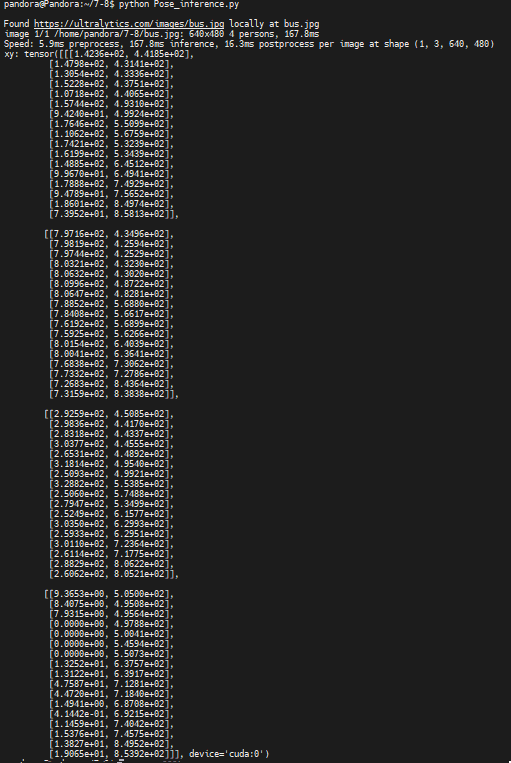
Pose Estimation Perform pose estimation on an image and print the results.
from ultralytics import YOLO
model = YOLO("yolo11n-pose.pt")
results = model.predict("https://ultralytics.com/images/bus.jpg")
for result in results:
    print(f'xy: {result.keypoints.xy}') # Keypoint data (Number of objects x 17 x 2)
You will then obtain the results.
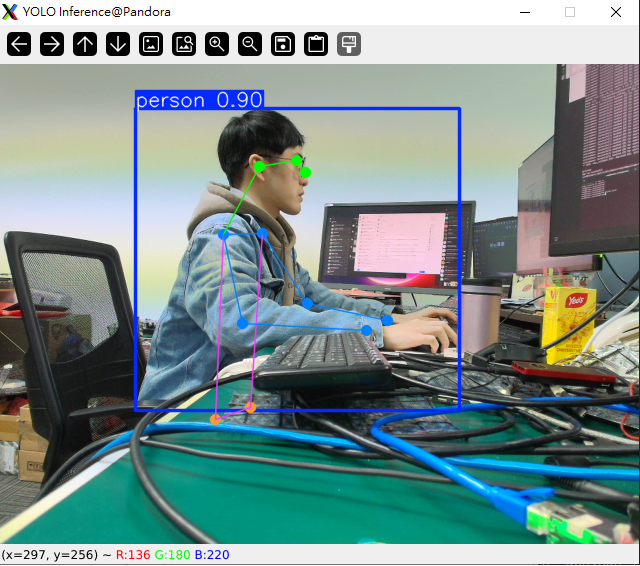
Perform pose estimation using a webcam and display the rendered results.
import cv2
from ultralytics import YOLO
model = YOLO("yolo11n-pose.pt")
video_path = 0
cap = cv2.VideoCapture(video_path)
while cap.isOpened():
    success, frame = cap.read()
    if success:
        results = model.predict(frame)
        annotated_frame = results[0].plot()
        cv2.imshow("YOLO Inference", annotated_frame)
        if cv2.waitKey(1) & 0xFF == ord("q"):
            break
    else:
        break
cap.release()
cv2.destroyAllWindows()
This will give you the results.
Adapted from the original YUAN Developer Hub article. Source ID: 262.