7-6 Object Detection
Learning Objectives
Object Detection is an important task in computer vision. Its goal is to enable a computer to identify what objects are present in an image or video and where they are located.
For a single image, an object detection system outputs:
1. Object Category (What)
For example: person, car, dog, cup
2. Object Location (Where)
Usually represented by a bounding box
to a rectangular box that encloses the object
3. Confidence Score (Confidence)
Indicates how certain the model is that the detected object belongs to a specific category
In this course, we will use Python and a pre-trained object detection model, YOLO to detect objects.
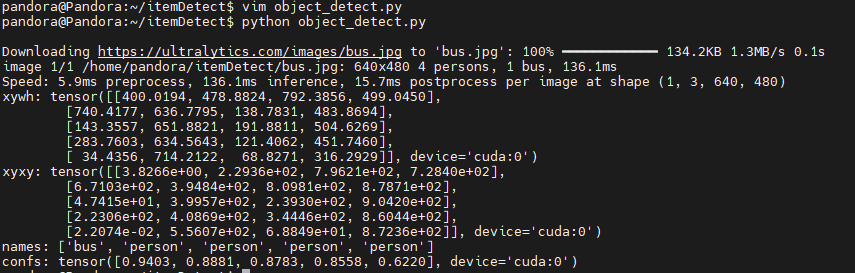
Detect objects in images and print results
from ultralytics import YOLO
model = YOLO("yolo11n.pt")
results = model.predict("https://ultralytics.com/images/bus.jpg")
for result in results:
    print(f'xywh: {result.boxes.xywh}') # Center coordinates (x, y) and dimensions (w, h)
    print(f'xyxy: {result.boxes.xyxy}') # Coordinates of the top-left and bottom-right corners (x1, y1, x2, y2)
    print(f'names: {[result.names[cls.item()] for cls in result.boxes.cls.int()]}') # Class name of the detected object
    print(f'confs: {result.boxes.conf}') # Confidence score of the detection
Enter the following command in the terminal.
python object_detect.py
You will then get the result.
Perform object detection using a webcam and render results
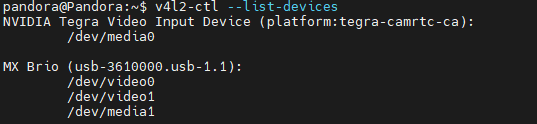
First, use v4l2-ctl --list-devices to identify the webcam, then check the order of the video devices listed.
import cv2
from ultralytics import YOLO
model = YOLO("yolo11n.pt")
# Set the order before video_path (example: video0 → set to 0).
video_path = 0
cap = cv2.VideoCapture(video_path)
while cap.isOpened():
    success, frame = cap.read()
    if success:
        results = model.predict(frame)
        annotated_frame = results[0].plot()
        cv2.imshow("YOLO Inference", annotated_frame)
        if cv2.waitKey(1) & 0xFF == ord("q"):
            break
    else:
        break
cap.release()
cv2.destroyAllWindows()
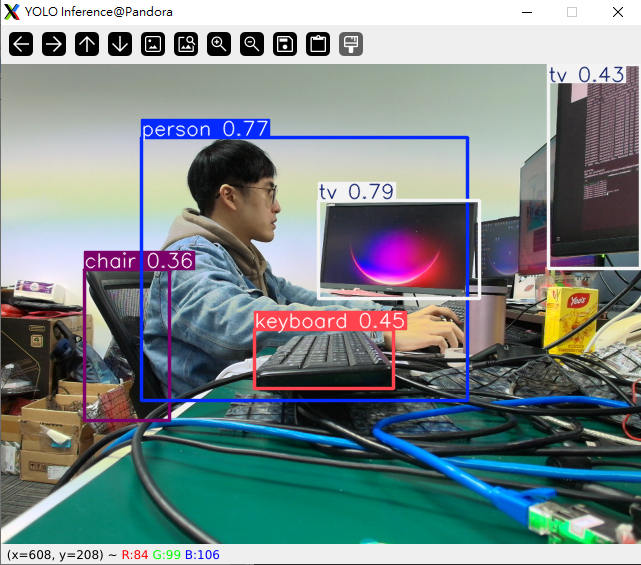
You will then obtain the object detection results.
Adapted from the original YUAN Developer Hub article. Source ID: 260.